Link
Link control provides a comprehensive link input with title, target, nofollow, and CSS classes options. Unlike the basic URL control, it stores multiple link attributes as an object, giving you full control over link behavior and styling.
Control Settings
Link Fields
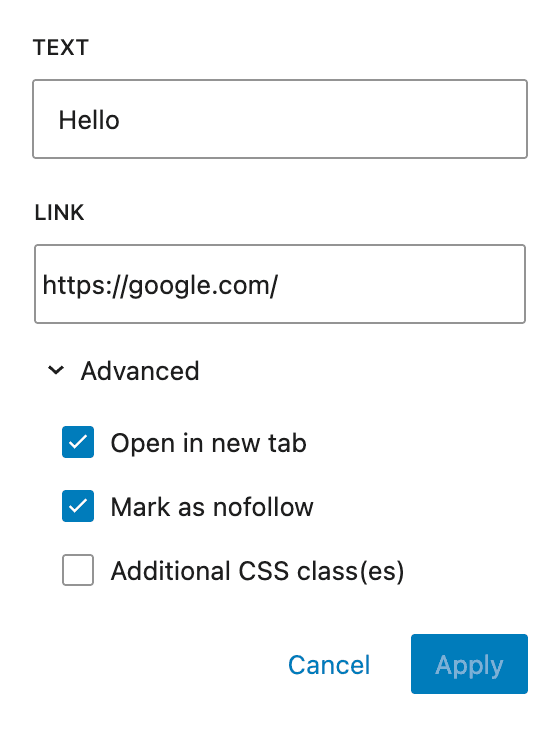
- Show Title Field - Allow users to set a custom title/text for the link
- Show "Open in new tab" Toggle - Allow users to toggle opening link in new tab
- Show "Mark as nofollow" Toggle - Allow users to add nofollow attribute to the link
- Show CSS Classes Field - Allow users to add custom CSS classes to the link
Link Suggestions
- Link Suggestions - Choose which content types appear in search results (Automatic, Disable, or specific post type)
- Show Initial Suggestions - Display suggestions immediately on focus
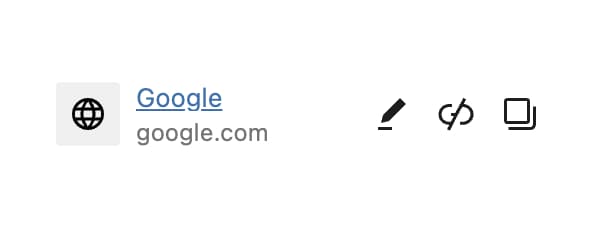
- Rich Preview - Show link preview with site title and image
Output Format
The Link control returns an object with the following properties:
| Property | Type | Description |
|---|---|---|
url | string | The link URL |
title | string | Custom link title/text |
opensInNewTab | boolean | Whether to open in new tab |
nofollow | boolean | Whether to add nofollow attribute |
cssClasses | string | Custom CSS classes |
Usage Examples
Basic Link Output
<?php
$link = $attributes['control_name'];
if ( $link && $link['url'] ) :
    $target = $link['opensInNewTab'] ? ' target="_blank"' : '';
    $rel_parts = [];
    if ( $link['opensInNewTab'] ) {
        $rel_parts[] = 'noopener';
        $rel_parts[] = 'noreferrer';
    }
    if ( $link['nofollow'] ) {
        $rel_parts[] = 'nofollow';
    }
    $rel = $rel_parts ? ' rel="' . implode( ' ', $rel_parts ) . '"' : '';
    $classes = $link['cssClasses'] ? ' class="' . esc_attr( $link['cssClasses'] ) . '"' : '';
    $title = $link['title'] ?: __( 'Click here', 'your-text-domain' );
?>
    <a href="<?php echo esc_url( $link['url'] ); ?>"<?php echo $target . $rel . $classes; ?>>
        <?php echo esc_html( $title ); ?>
    </a>
<?php endif; ?>
Button with Link
<?php
$link = $attributes['control_name'];
if ( $link && $link['url'] ) :
    $attrs = [
        'href'  => esc_url( $link['url'] ),
        'class' => 'button ' . esc_attr( $link['cssClasses'] ?? '' ),
    ];

    if ( $link['opensInNewTab'] ) {
        $attrs['target'] = '_blank';
        $attrs['rel'] = 'noopener noreferrer';
    }

    if ( $link['nofollow'] ) {
        $attrs['rel'] = ( $attrs['rel'] ?? '' ) . ' nofollow';
    }

    $attr_string = '';
    foreach ( $attrs as $key => $value ) {
        $attr_string .= sprintf( ' %s="%s"', $key, trim( $value ) );
    }
?>
    <a<?php echo $attr_string; ?>>
        <?php echo esc_html( $link['title'] ?: __( 'Learn More', 'your-text-domain' ) ); ?>
    </a>
<?php endif; ?>
Handlebars Usage
{{#if control_name.url}}
  <a href="{{control_name.url}}"
     {{#if control_name.opensInNewTab}}target="_blank" rel="noopener noreferrer"{{/if}}
     {{#if control_name.cssClasses}}class="{{control_name.cssClasses}}"{{/if}}>
    {{#if control_name.title}}
      {{control_name.title}}
    {{else}}
      Click here
    {{/if}}
  </a>
{{/if}}
Post Meta
<?php
$link = get_lzb_meta( 'control_meta_name' );
if ( $link && ! empty( $link['url'] ) ) {
    $target = ! empty( $link['opensInNewTab'] ) ? '_blank' : '_self';
    $rel = [];

    if ( ! empty( $link['opensInNewTab'] ) ) {
        $rel[] = 'noopener';
        $rel[] = 'noreferrer';
    }
    if ( ! empty( $link['nofollow'] ) ) {
        $rel[] = 'nofollow';
    }

    printf(
        '<a href="%1$s" target="%2$s"%3$s%4$s>%5$s</a>',
        esc_url( $link['url'] ),
        esc_attr( $target ),
        $rel ? ' rel="' . esc_attr( implode( ' ', $rel ) ) . '"' : '',
        ! empty( $link['cssClasses'] ) ? ' class="' . esc_attr( $link['cssClasses'] ) . '"' : '',
        esc_html( $link['title'] ?: __( 'Read More', 'your-text-domain' ) )
    );
}
?>- Always use
esc_url()when outputting URLs to prevent XSS attacks. - When
opensInNewTabis true, always includerel="noopener noreferrer"for security. - The Link control stores data as an object, so access properties using array syntax in PHP.