Link
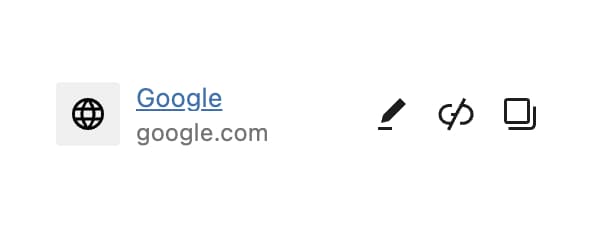
Link control is a link input with title, target, nofollow and CSS class options. The URL control stores a plain URL string, while this one stores the whole set as an object.
Control Settings
Link Fields
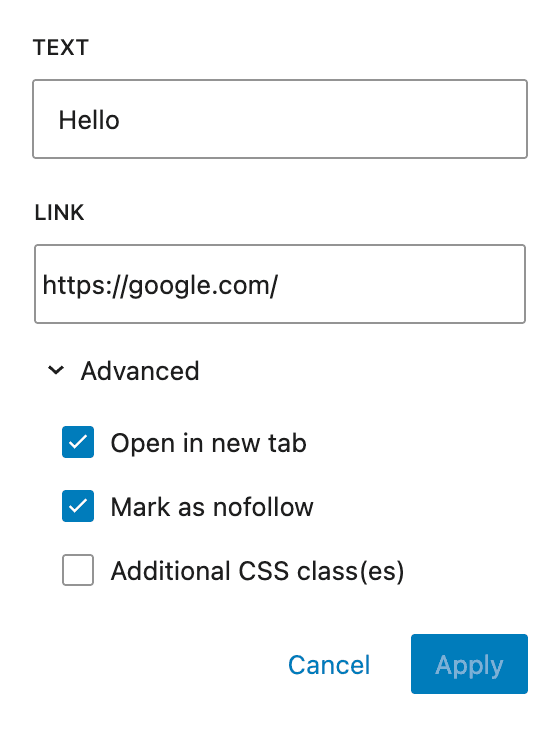
All four are on by default, and each one hides a row of the link popover. The saved object keeps all five properties either way, so a hidden field leaves its property empty rather than dropping it.
- Show Title Field (
show_title_field) - the Text field that fillstitle - Show "Open in new tab" Toggle (
show_target_field) - the Open in new tab checkbox - Show "Mark as nofollow" Toggle (
show_nofollow_field) - the Mark as nofollow checkbox - Show CSS Classes Field (
show_classes_field) - the Additional CSS class(es) checkbox and the input it reveals, which turns commas into spaces and collapses repeated spaces
Link Suggestions
- Link Suggestions (
link_suggestions) -Automaticby default, which searches every viewable post type.Disable suggestionsturns the search off, and picking one post type limits the search to it - Show Initial Suggestions (
show_initial_link_suggestions) - off by default. Lists suggestions before anything is typed, and the row is hidden while Link Suggestions isDisable suggestions - Rich Preview (
rich_preview) - off by default. Shows the target's site title and image inside the field
Output Format
The Link control returns an object with the following properties:
| Property | Type | Description |
|---|---|---|
url | string | The link URL |
title | string | Custom link title/text |
opensInNewTab | boolean | Whether to open in new tab |
nofollow | boolean | Whether to add nofollow attribute |
cssClasses | string | Custom CSS classes |
Usage Examples
Basic Link Output
<?php
$link = $attributes['control_name'];
if ( $link && $link['url'] ) :
    $target = $link['opensInNewTab'] ? ' target="_blank"' : '';
    $rel_parts = [];
    if ( $link['opensInNewTab'] ) {
        $rel_parts[] = 'noopener';
        $rel_parts[] = 'noreferrer';
    }
    if ( $link['nofollow'] ) {
        $rel_parts[] = 'nofollow';
    }
    $rel = $rel_parts ? ' rel="' . implode( ' ', $rel_parts ) . '"' : '';
    $classes = $link['cssClasses'] ? ' class="' . esc_attr( $link['cssClasses'] ) . '"' : '';
    $title = $link['title'] ?: __( 'Click here', 'your-text-domain' );
?>
    <a href="<?php echo esc_url( $link['url'] ); ?>"<?php echo $target . $rel . $classes; ?>>
        <?php echo esc_html( $title ); ?>
    </a>
<?php endif; ?>
Button with Link
<?php
$link = $attributes['control_name'];
if ( $link && $link['url'] ) :
    $attrs = [
        'href'  => esc_url( $link['url'] ),
        'class' => 'button ' . esc_attr( $link['cssClasses'] ?? '' ),
    ];

    if ( $link['opensInNewTab'] ) {
        $attrs['target'] = '_blank';
        $attrs['rel'] = 'noopener noreferrer';
    }

    if ( $link['nofollow'] ) {
        $attrs['rel'] = ( $attrs['rel'] ?? '' ) . ' nofollow';
    }

    $attr_string = '';
    foreach ( $attrs as $key => $value ) {
        $attr_string .= sprintf( ' %s="%s"', $key, trim( $value ) );
    }
?>
    <a<?php echo $attr_string; ?>>
        <?php echo esc_html( $link['title'] ?: __( 'Learn More', 'your-text-domain' ) ); ?>
    </a>
<?php endif; ?>
Handlebars Usage
{{#if control_name.url}}
  <a href="{{control_name.url}}"
     {{#if control_name.opensInNewTab}}target="_blank" rel="noopener noreferrer"{{/if}}
     {{#if control_name.cssClasses}}class="{{control_name.cssClasses}}"{{/if}}>
    {{#if control_name.title}}
      {{control_name.title}}
    {{else}}
      Click here
    {{/if}}
  </a>
{{/if}}
Post Meta
<?php
$link = get_lzb_meta( 'control_meta_name' );
if ( $link && ! empty( $link['url'] ) ) {
    $target = ! empty( $link['opensInNewTab'] ) ? '_blank' : '_self';
    $rel = [];

    if ( ! empty( $link['opensInNewTab'] ) ) {
        $rel[] = 'noopener';
        $rel[] = 'noreferrer';
    }
    if ( ! empty( $link['nofollow'] ) ) {
        $rel[] = 'nofollow';
    }

    printf(
        '<a href="%1$s" target="%2$s"%3$s%4$s>%5$s</a>',
        esc_url( $link['url'] ),
        esc_attr( $target ),
        $rel ? ' rel="' . esc_attr( implode( ' ', $rel ) ) . '"' : '',
        ! empty( $link['cssClasses'] ) ? ' class="' . esc_attr( $link['cssClasses'] ) . '"' : '',
        esc_html( $link['title'] ?: __( 'Read More', 'your-text-domain' ) )
    );
}
?>- Always use
esc_url()when outputting URLs to prevent XSS attacks. - When
opensInNewTabis true, always includerel="noopener noreferrer"for security. - The Link control stores data as an object, so access properties using array syntax in PHP.