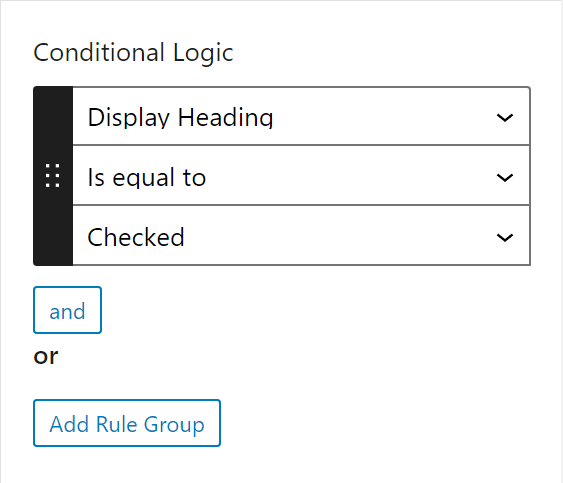
Conditional Logic
Conditional Logic hides a control in the block editor until its rules pass. A block with a Layout select and eight layout-specific options shows two controls instead of nine, and the seven that do not apply are out of the way rather than greyed out.
Rules are set per control. Open the control in the block builder, find Conditional Logic in its settings, and add a rule.

What a rule can test
A rule has three parts: what to look at, an operator, and a value to compare against.
The first dropdown lists every control on the block under a Controls heading, and two more sources under Other:
| Source | What it reads |
|---|---|
| any control | that control's stored value |
CSS Class Name | the block's className attribute, which holds whatever a user typed in the Advanced panel |
Block Styles | the applied style variation, matched through className |
Block Styles is greyed out until the block has at least one style variation.
A control inside a Repeater appears in the list under its parent, and stores its target as parent-name.child-name.
Operators
Nine operators exist. Which ones the second dropdown offers depends on the control type, because most of them only make sense for some kinds of value.
| Label | Stored value | Offered for |
|---|---|---|
Has any value | !=empty | every control except Checkbox, Toggle, Inner Blocks and Message, plus both Other sources |
Has no value | ==empty | the same list |
Is equal to | == | Text, Textarea, Number, Range, URL, Email, Password, Rich Text, Classic Editor, Code Editor, Select, Radio, Color Picker, Date Time Picker, Units, Checkbox, Toggle |
Is not equal to | != | the same list |
Contains | ==contains | the Is equal to list minus Checkbox and Toggle, plus CSS Class Name |
Is greater than | > | Number, Range, Gallery, Posts, Taxonomy, Users, Repeater |
Is less than | < | the same list |
Has class | ==class | CSS Class Name |
Has no class | !=class | CSS Class Name |
On Block Styles the last two are labelled Has style and Has no style.
Two control types behave differently from the rest. Checkbox and Toggle are not offered the empty operators at all, and their value field is locked to a single option, Checked. Inner Blocks has a name so it appears in the list, but no operator applies to it, so its operator dropdown comes up empty.
The value field changes with the source. Select and Radio give you a dropdown of their own choices, Block Styles gives you a dropdown of the block's style variations, and everything else is a text field.
A count, not a value
For Gallery, Repeater, Posts, Taxonomy and Users, Is greater than and Is less than compare the number of items, not the value. "Is greater than 2" on a Gallery control means the block has three images or more. On a Repeater it means three rows or more.
The same conversion makes the empty operators work on these controls: an empty gallery counts as no value, so Has no value passes.
Posts, Taxonomy and Users only hold a list when their Multiple setting is on. With Multiple off they hold a single value, and the range operators compare that value as a number instead of counting it.
Rules, and groups of rules
Inside a group, and joins the rules. Every rule in the group has to pass.
Between groups, or joins them. The control is shown when any one group passes in full.
So this pair of groups:
Group 1 layout Is equal to grid
images Is greater than 2
or
Group 2 Block Styles Has style outline
shows the control on a grid layout with more than two images, or on any block using the outline style.
Add a rule to the current group with the and button. Add a whole new group with Add Rule Group.
Matching a style or a class
Has class matches a whole class name, not a fragment. A rule of Has class and card passes for card wide and fails for card-wide. Use Contains when you want a fragment.
Block Styles stores the style's name and matches the class Gutenberg generates from it. A variation named outline is stored as outline and matched against is-style-outline, so you pick the name from the dropdown and never type the class yourself.
A block that has never had a class or a style applied has no className attribute at all, and a rule against it is skipped rather than passed or failed.
What it does not do
Conditional Logic is an editor feature and nothing more. It decides whether a control is drawn in the inspector or in the block body. It does not touch the stored value and it does not touch the rendered block.
Three consequences follow, and all three surprise people:
- A hidden control keeps its value. Hide a control after someone filled it in and the value is still on the block, still passed to your block code, and still printed on the front end.
- Your template has to repeat the condition. If the output should disappear along with the control, guard it in Handlebars with
{{#if}}or in PHP with anifof your own. - A required control that is hidden still blocks saving. The save lock checks every control on the block without consulting its rules, so a required control hidden by conditional logic locks the post with no visible field to fix. Do not mark a conditional control as required.
Where the rules are stored
The rules live on the control itself, under conditional_logic, as an array of groups where each group is an array of rules. Exporting a block carries them along.
"control_a1b2c3": {
"type": "number",
"name": "columns",
"label": "Columns",
"placement": "inspector",
"conditional_logic": [
[
{ "control": "layout", "operator": "==", "value": "grid" },
{ "control": "images", "operator": ">", "value": "2" }
],
[
{ "control": "__BLOCK_STYLE__", "operator": "==class", "value": "outline" }
]
]
}value is always a string, even for the numeric comparisons, and it is absent on a rule using one of the empty operators. __BLOCK_STYLE__ is how Block Styles is stored; CSS Class Name is stored as className.
A rule that targets a Repeater child from outside the Repeater reads the first row only. Rules on controls inside the Repeater are evaluated per row, so each row shows and hides its own controls independently.