Relationships
A block can hand its own values to the blocks nested inside it, and can say which blocks may contain it and which blocks it may contain. The settings are in the block builder's Condition panel, under Relationships.
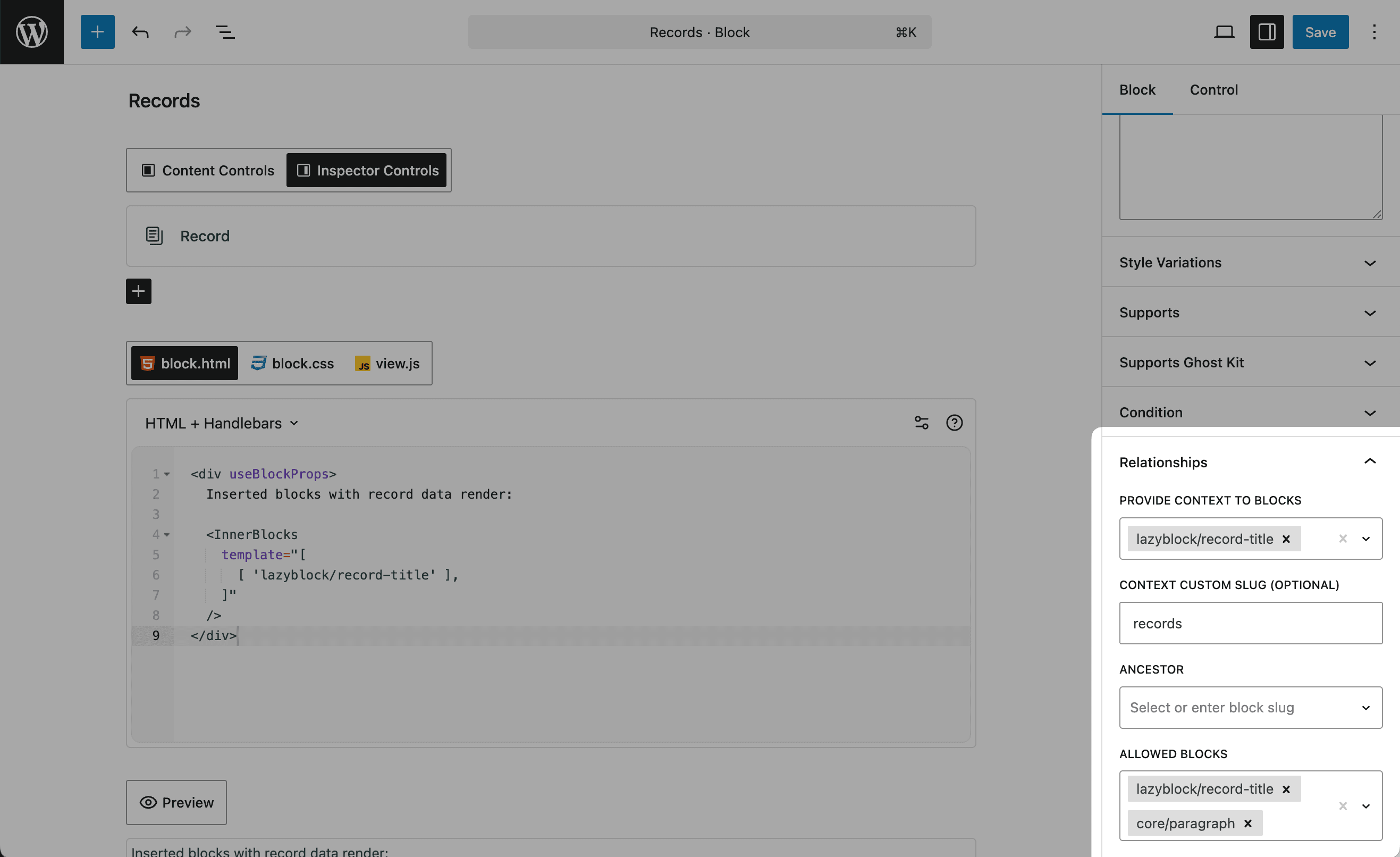
Relationship settings
Provide Context to Blocks
The blocks that receive every attribute of this one as context data. A block listed here reads the values instead of carrying its own copy of them.
Context Custom Slug (Optional)
The namespace the context keys are built from. The block's own slug is used when this is empty, so a key looks like lazyblock/my-custom-block/control-name.
Ancestor
Which blocks may contain this one. The block cannot be inserted anywhere else.
Allowed Blocks
Which blocks may be inserted into this block's <InnerBlocks /> area.
Reading the context
In PHP access context data using the $context array:
$value = $context['parent-block-slug/control-name'] ?? 'default';In Handlebars use square bracket notation for context variables:
{{[parent-block-slug/control-name]}}Square brackets are required in Handlebars when the context name contains a
slash: {{[parent-slug/control-name]}}
Example: an API dashboard
A parent block holds the API settings once, and several child blocks show different views of the same source without a second copy of those settings.
Step 1: the parent block
Create a new block lazyblock/api-dashboard:
-
Add these controls:
api-endpoint(URL control)refresh-interval(Number control)api-key(Text control)data-format(Select control: JSON, XML, CSV)
-
In Relationships panel:
- Provide Context to Blocks: Select
lazyblock/data-table,lazyblock/data-chart,lazyblock/data-summary - Allowed Blocks: Add
core/paragraph,core/heading,lazyblock/data-table,lazyblock/data-chart,lazyblock/data-summary
- Provide Context to Blocks: Select
Block Code:
<div useBlockProps>
  <div class="dashboard-header">
    <h2>Data Dashboard</h2>
    <p>Source: <?php echo esc_url($attributes['api-endpoint']); ?></p>
    <p>Updates every <?php echo esc_html($attributes['refresh-interval']); ?> seconds</p>
  </div>

  <InnerBlocks
    template="[
      [ 'core/heading', { content: 'Key Metrics', level: 3 } ],
      [ 'lazyblock/data-summary' ],
      [ 'core/heading', { content: 'Detailed View', level: 3 } ],
      [ 'lazyblock/data-table' ],
      [ 'lazyblock/data-chart' ]
    ]"
  />
</div>
Step 2: the child blocks
Create data display blocks that inherit API configuration:
Data Table Block (lazyblock/data-table)
- In Relationships panel:
- Ancestor: Select
lazyblock/api-dashboard
- Ancestor: Select
Block Code:
<?php

$api_endpoint = $context['api-dashboard/api-endpoint'] ?? '';
$api_key = $context['api-dashboard/api-key'] ?? '';
$data_format = $context['api-dashboard/data-format'] ?? 'json';

?>

<div useBlockProps>
  <?php if ($api_endpoint): ?>
    <div class="data-table">
      <table>
        <thead>
          <tr><th>Data Table</th><th>Format: <?php echo esc_html($data_format); ?></th></tr>
        </thead>
        <tbody>
          <tr>
            <td>API Source:</td>
            <td><?php echo esc_url($api_endpoint); ?></td>
          </tr>
          <!-- Table data would be populated via JavaScript/AJAX using the context values -->
        </tbody>
      </table>
    </div>
  <?php else: ?>
    <p>Configure API endpoint in the parent Dashboard block...</p>
  <?php endif; ?>
</div>
Data Chart Block (lazyblock/data-chart)
Similar structure but displays data as charts:
Block Code:
<?php

$api_endpoint = $context['api-dashboard/api-endpoint'] ?? '';
$refresh_interval = $context['api-dashboard/refresh-interval'] ?? 30;

?>

<div useBlockProps>
  <?php if ($api_endpoint): ?>
    <div class="data-chart"
         data-endpoint="<?php echo esc_attr($api_endpoint); ?>"
         data-refresh="<?php echo esc_attr($refresh_interval); ?>">
      <canvas id="dashboard-chart"></canvas>
      <p>Auto-refresh: <?php echo esc_html($refresh_interval); ?>s</p>
    </div>
  <?php else: ?>
    <p>Configure API settings in the parent Dashboard block...</p>
  <?php endif; ?>
</div>
Using Handlebars:
<div useBlockProps>
  {{#if [api-dashboard/api-endpoint]}}
    <div class="data-chart"
         data-endpoint="{{[api-dashboard/api-endpoint]}}"
         data-refresh="{{[api-dashboard/refresh-interval]}}">
      <canvas id="dashboard-chart"></canvas>
      <p>Auto-refresh: {{[api-dashboard/refresh-interval]}}s</p>
    </div>
  {{else}}
    <p>Configure API settings in the parent Dashboard block...</p>
  {{/if}}
</div>
Third-party blocks
Provide Context to Blocks is a creatable multi-select. The dropdown lists the other Lazy Blocks on the site, and anything you type is accepted as well, so core/paragraph or a slug from another plugin can be added by hand.
Nothing has to be declared on the consumer's side. A core/paragraph placed inside the provider reads the value in its edit function:
const heading = props.context["lazyblock/my-card/heading"];A block rendered on the server reads the same key from the WP_Block instance:
$heading = $block->context['lazyblock/my-card/heading'] ?? '';Keys a provider hands out
One key per control, {context_slug}/{control_name}, plus three fixed keys: {context_slug}/blockId, {context_slug}/className and {context_slug}/anchor. The {context_slug} part is the Context Custom Slug when it is filled in, and the provider's full block slug otherwise.
The child controls of a repeater are listed among the keys with no parent prefix and no filtering, while the repeater stores its rows as a single value. Read the repeater's own key instead of a child's.
Two things keep context from arriving:
- The consumer must be a descendant of the provider in the block tree. That is a WordPress rule rather than a Lazy Blocks one, so a block sitting next to the provider receives nothing.
- A provider with no controls contributes no keys at all, the three fixed ones included.