Token Field
Token Field control provides a tag-style input for selecting multiple values from predefined choices. Users can type to search and select options, which appear as removable tokens/tags.
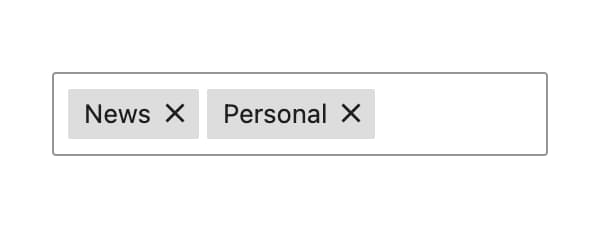
This control is ideal for selecting multiple items in a compact, user-friendly way - similar to how tags work in WordPress posts.
Control Settings
- Choices - Define options for users to choose from
- Allow Custom Values - Allow users to add values not in the predefined choices
- Multiple - Allow selecting multiple values (enabled by default)
- Output Format - Choose data format:
Value- Returns option valueLabel- Returns option labelBoth (Array)- Returns object with both value and label
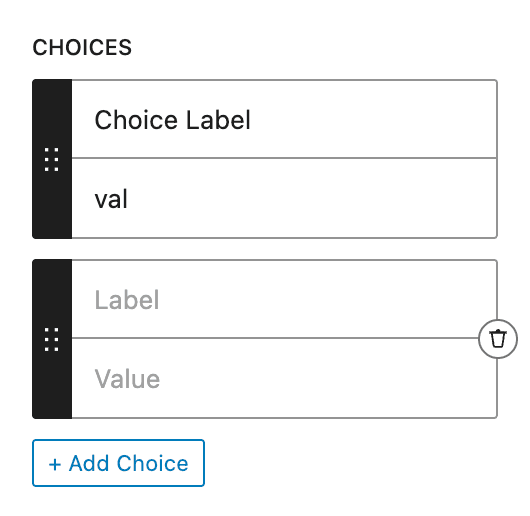
To add options, fill the Choices setting the same way as Select or Radio controls:
Usage Examples
Multiple Selection (Default)
<?php if ( $attributes['control_name'] ) : ?>
    <ul class="tags-list">
        <?php foreach ( $attributes['control_name'] as $value ) : ?>
            <li class="tag tag-<?php echo esc_attr( $value ); ?>">
                <?php echo esc_html( $value ); ?>
            </li>
        <?php endforeach; ?>
    </ul>
<?php endif; ?>{{#if control_name}}
<ul class="tags-list">
{{#each control_name}}
<li class="tag tag-{{this}}">{{this}}</li>
{{/each}}
</ul>
{{/if}}Single Selection
When Multiple is disabled, the control returns a single value:
<?php if ( $attributes['control_name'] ) : ?>
    <span class="selected-tag">
        <?php echo esc_html( $attributes['control_name'] ); ?>
    </span>
<?php endif; ?>{{#if control_name}}
<span class="selected-tag">{{control_name}}</span>
{{/if}}Label Output Format
<?php if ( $attributes['control_name'] ) : ?>
    <div class="selected-labels">
        <?php foreach ( $attributes['control_name'] as $label ) : ?>
            <span class="label"><?php echo esc_html( $label ); ?></span>
        <?php endforeach; ?>
    </div>
<?php endif; ?>
Array Output Format
When using "Both (Array)" format, each item contains both value and label:
<?php if ( $attributes['control_name'] ) : ?>
    <ul class="features-list">
        <?php foreach ( $attributes['control_name'] as $item ) : ?>
            <li class="feature-<?php echo esc_attr( $item['value'] ); ?>">
                <?php echo esc_html( $item['label'] ); ?>
            </li>
        <?php endforeach; ?>
    </ul>
<?php endif; ?>{{#if control_name}}
<ul class="features-list">
{{#each control_name}}
<li class="feature-{{this.value}}">
{{this.label}}
</li>
{{/each}}
</ul>
{{/if}}Post Meta
<?php
$values = get_lzb_meta( 'control_meta_name' );
if ( $values && is_array( $values ) ) {
    echo '<div class="meta-tags">';
    foreach ( $values as $value ) {
        printf(
            '<span class="meta-tag">%s</span>',
            esc_html( $value )
        );
    }
    echo '</div>';
}
?>