Overview
Lazy Blocks is a WordPress plugin for building custom blocks. You define a block on a screen in wp-admin rather than in a code editor, and you write its markup in Handlebars or PHP rather than in React. There is no build step and no block.json to maintain.
What a block is here
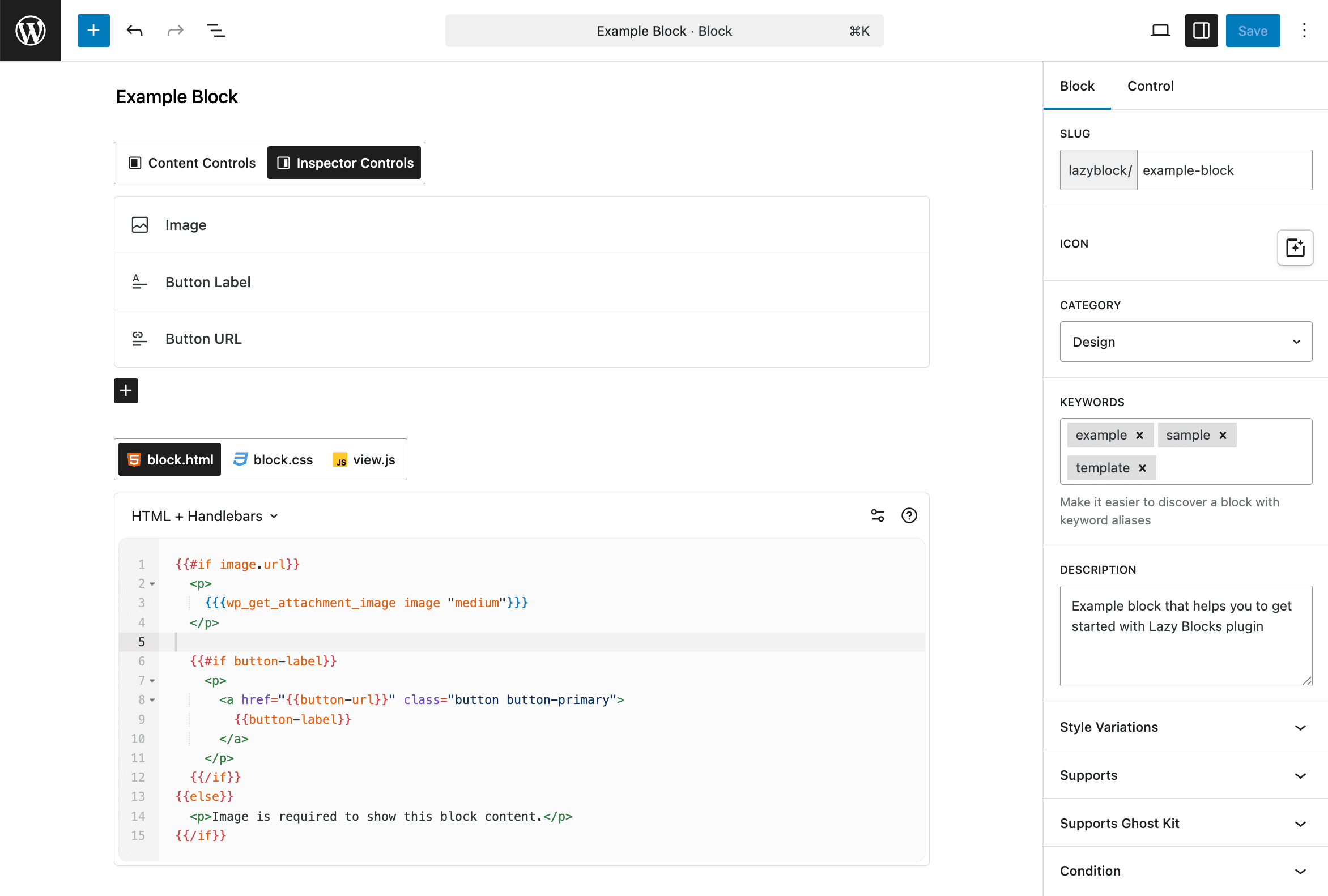
A block is a WordPress post of the lazyblocks type. It holds three things:
Controls. The fields a person filling in the block sees. A control has a type, a name, and a place to appear, either in the inspector sidebar or in the block body on the canvas. Roughly thirty types ship with the plugin, from a plain text field to an image picker to a repeater. See Controls.
Code. What the block outputs. Each control's value arrives in your markup under the name you gave it. See Block Code.
Settings. The title, icon, category and keywords that put the block in the inserter, plus the WordPress block supports you want enabled, such as alignment, colour or spacing. See Create Block.
Once saved and published, the block registers like any other and appears in the inserter. Deactivating it takes it out again without deleting it. See Blocks Screen.
Writing the output
Three output methods, chosen per block:
HTML + Handlebars is the default. Control values are interpolated as {{control-name}}, and the plugin registers helpers for truncating a string, comparing two values, running a shortcode and formatting a date.
PHP gives you $attributes['control-name'] and the whole WordPress API. Use it when the block queries something or branches on more than a template can express.
Theme Template moves the markup into a file in your theme, at blocks/<block-slug>/block.php, so it lives in version control alongside the rest of the theme.
Alongside the markup you can attach CSS and a front-end script, both loaded only on pages where the block is used. See Styles & Scripts.
Four components work inside block code regardless of the output method: useBlockProps for the block wrapper, InnerBlocks for nesting other blocks inside yours, RichText for editing a value directly on the canvas, and a PHP callback for rendering from a function in your theme.
Fields without a block
A control can store its value in post meta instead of in the block. That turns the block builder into a custom fields editor: define the fields, place the block on the post, and read the values in your theme with get_lzb_meta( 'field_name' ). See Display Custom Fields.
Free and Pro
The free plugin on WordPress.org builds complete blocks. It carries the block builder, all three output methods, block styles and scripts, and twenty of the control types, including Repeater, Gallery, Image, Rich Text and Inner Blocks.
Pro adds nine more control types, the ones that query WordPress or lay the inspector out: Posts, Taxonomy, Users, Link, Units, Token Field, Panel, Divider and Message. It also adds:
- Conditional Logic, which hides a control until its rules pass
- RichText on the canvas, so a value is typed in place instead of in the sidebar
- Collections and custom namespaces, which register your blocks under your own name rather than
lazyblock/ - Editor preloading, which renders block previews with the edit screen instead of one request per block
- Rank Math and Yoast support, so their content analysis reads the rendered block rather than the raw markup
Free vs Pro compares the two feature by feature.
Getting started
Install the plugin, then build your first block. The Alert Block walkthrough builds one end to end.
If you are weighing this against writing a block in React, WordPress custom blocks compares the three ways of building one.